DevEye: Chrome extension for AI-ready web inspection and reports
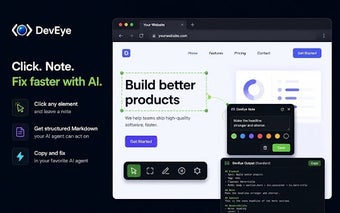
DevEye by Ajit Kihor is a Chrome extension that turns the browser into a feedback tool for AI-assisted web development and bug reporting. It captures element-level context and delivers the exact technical details AI coding agents need to identify and fix issues. The extension bundles in-browser annotation and report controls to shorten the feedback loop. Web developers, UI designers, and product managers who use AI assistants get clearer, actionable issue descriptions tied to live pages.
DevEye converts visual elements into machine-readable bug reports
DevEye produces structured Markdown reports tailored for automated coding agents, packaging element descriptors the tool extracts from the page. Reports include a clear list of element attributes, and the extension can output:
- DOM path
- CSS classes
- computed styles
- accessibility hints
Four selectable detail levels let the user choose a compact summary or a deep "Forensic" dump for root-cause analysis.
Selection and capture tools preserve accuracy even on dynamic content
The extension's capture workflow emphasizes precision, offering click-to-annotate plus multi-select and drag-select modes for bulk notes. An animation-freeze control pauses dynamic content so selections remain accurate. A draggable toolbar keeps controls accessible without covering content, and theme support includes dark and light modes. Notes persist per page and survive reloads, so teams can keep an inspection thread open across development sessions.
Integration choices and platform fit target AI-driven teams
The tool integrates with common AI coding assistants by producing Markdown outputs formatted to feed agents directly, a workflow the developer designed specifically for tools such as Claude, Cursor and Copilot. Compatibility extends across Chrome and other Chromium-based browsers, so teams using alternative Chromium clients can adopt the same inspection flow. The feature set targets web developers, UI designers and product managers who need to remove ambiguity from manual bug reports.
Best suited to AI-driven teams that need unambiguous bug context
DevEye fits teams that route issues through AI coding assistants, providing a focused path from page observation to automated suggestions; its early user base rates the approach positively. The trade-off is a specialized workflow that requires some upfront practice by designers and developers. Tip: adopt a short internal convention for report detail levels so teammates interpret exported context consistently. This reduces back-and-forth and speeds resolution.